
Average Aggregation
The Average aggregation calculates the mean value of transactions or amounts per cardholder within a defined timeframe. Use it to analyze typical transaction frequency or spending patterns and detect anomalies.
Calculate average spend per day, week, or month.
Track average transactions per time period.
Compare current transactions to historical averages.
Configuration
Parameter
| Parameter | Description |
|---|---|
| Transactions | Average number of transactions |
| Amount (EUR) | Average spend in EUR |
| Amount (USD) | Average spend in USD |
Average Bucket Timeframe
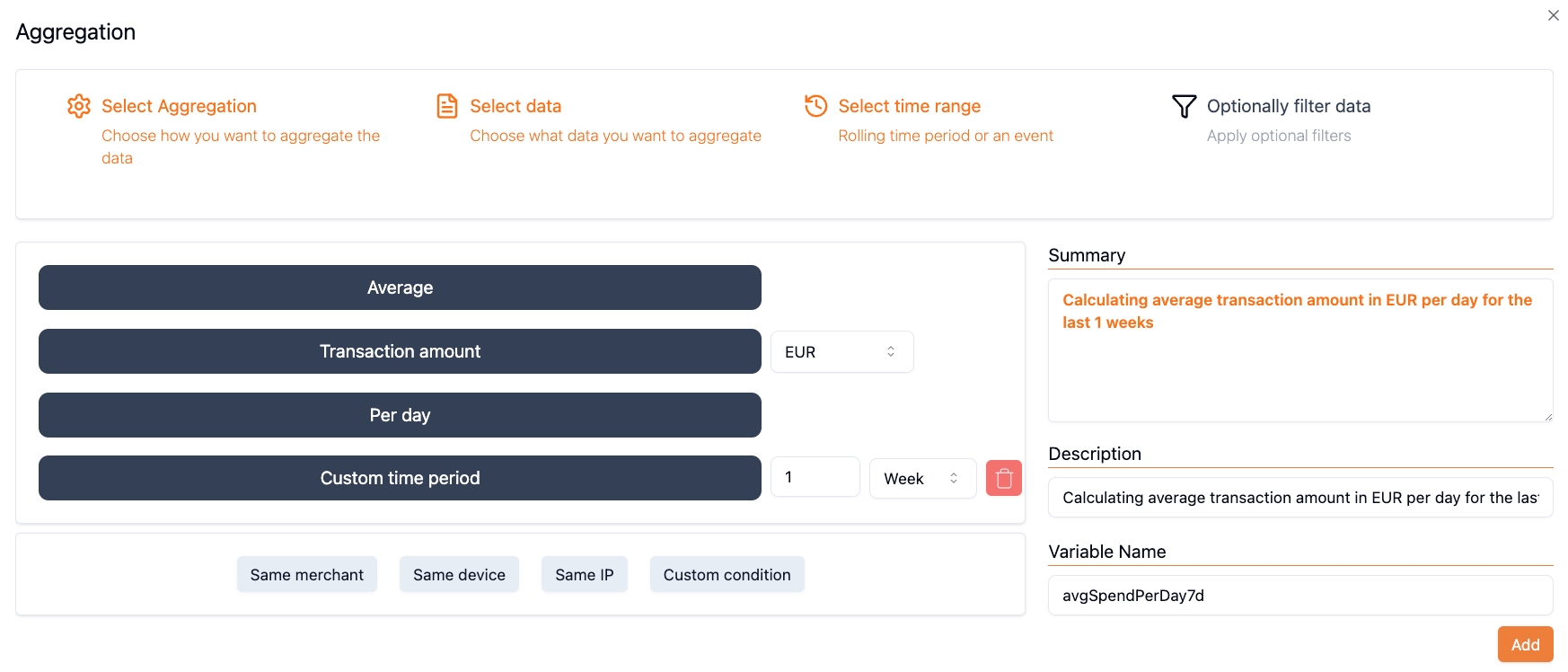
The period over which the average is calculated:
| Bucket | Description |
|---|---|
| Per Day | Average per day |
| Per Week | Average per week |
| Per Month | Average per month |
Regular Timeframe
Overall period for aggregation (based on bucket selection):
| Bucket | Available Timeframes |
|---|---|
| Per Day | Days (1–365), Weeks (1–52), Months (1–12) |
| Per Week | Weeks (1–52), Months (1–12) |
| Per Month | Months (1–12) |
Filter (Optional)
Narrow the average to specific conditions:
- Transaction status
- Merchant name or ID
- Device IP or ID
Variable Name
Unique identifier (e.g., avgTransPerDay30d, avgSpendUSD1m).
Using Average in Rules
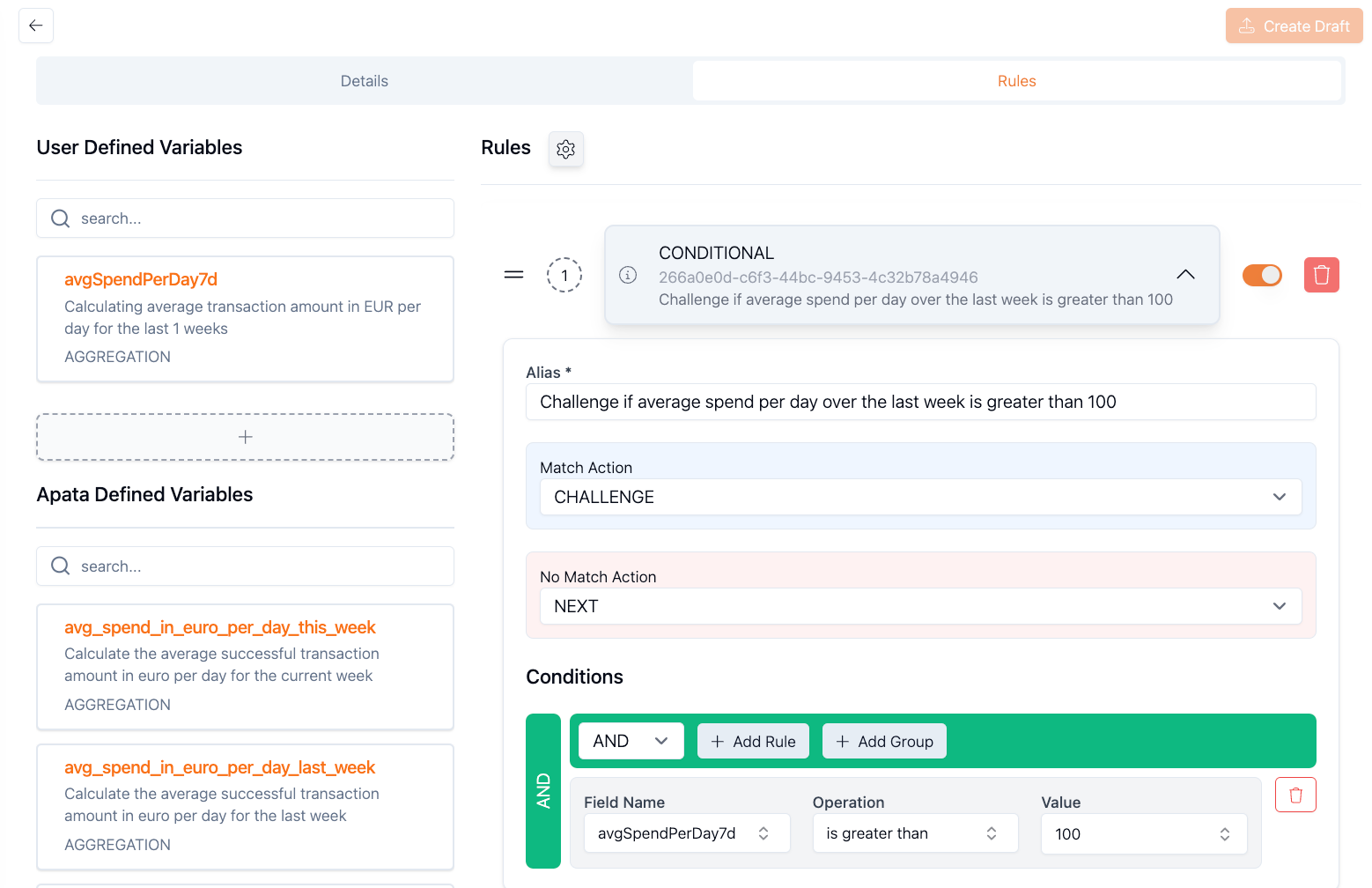
avgSpendUSD1m > 100 → Challenge
avgTransPerDay30d > 5 → Reject
amount > avgSpendUSD1m → Challenge
transactionCount > avgTransPerDay30d → RejectExamples
Average Transactions Per Day (30 Days)
Detect unusual transaction frequency.
Type: Average
Parameter: Transactions
Filter: Transaction Status = Succeeded
Average Bucket: Per Day
Timeframe: 30 days
Variable Name: avgTransPerDay30d
Rule: transactionCount > avgTransPerDay30d → Challenge
Average Spend Per Week by Device IP
Monitor spending patterns from specific IPs.
Type: Average
Parameter: Amount (USD)
Filter:
  - Transaction Status = Succeeded
  - Device IP = Equals to Current
Average Bucket: Per Week
Timeframe: 4 weeks
Variable Name: avgSpendUSDPerWeek4w
Rule: amount > avgSpendUSDPerWeek4w → Challenge
Average Merchant Spend Per Day
Track merchant-specific spending patterns.
Type: Average
Parameter: Amount (EUR)
Filter:
  - Merchant Name = Equals to Current
  - Transaction Status = Succeeded
Average Bucket: Per Day
Timeframe: 30 days
Variable Name: avgMerchantSpendEUR30d
Rule: amount > avgMerchantSpendEUR30d → Challenge
Average Transactions Per Week by Device
Identify unusual device activity.
Type: Average
Parameter: Transactions
Filter:
  - Computed Device ID = Equals to Current
  - Transaction Status = Succeeded
Average Bucket: Per Week
Timeframe: 3 months
Variable Name: avgTransPerWeek3m
Rule: transactionCount > avgTransPerWeek3m → Challenge
Average Monthly Spend (6 Months)
Long-term spending behaviour.
Type: Average
Parameter: Amount (USD)
Filter: None
Average Bucket: Per Month
Timeframe: 6 months
Variable Name: avgSpendUSD6m
Rule: amount > avgSpendUSD6m → Challenge
How It Works
sequenceDiagram
    participant Card
    participant Aggregation as Aggregation Engine
    participant Rule as Conditional Rule

    Note over Card,Rule: 7-day period, averaging per day

    Card->>Aggregation: Transaction 1: €100 (Day 1)
    Aggregation-->>Aggregation: avgSpend = €0 (no prior)
    Aggregation->>Rule: amount > avg? (Yes, challenge)

    Card->>Aggregation: Transaction 2: €80 (Day 1)
    Aggregation-->>Aggregation: avgSpend = €100
    Aggregation->>Rule: amount > avg? (No, accept)

    Card->>Aggregation: Transaction 3: €200 (Day 2)
    Aggregation-->>Aggregation: avgSpend = €90
    Aggregation->>Rule: amount > avg? (Yes, challenge)
The average is calculated from prior transactions, excluding the current one.
Getting Started
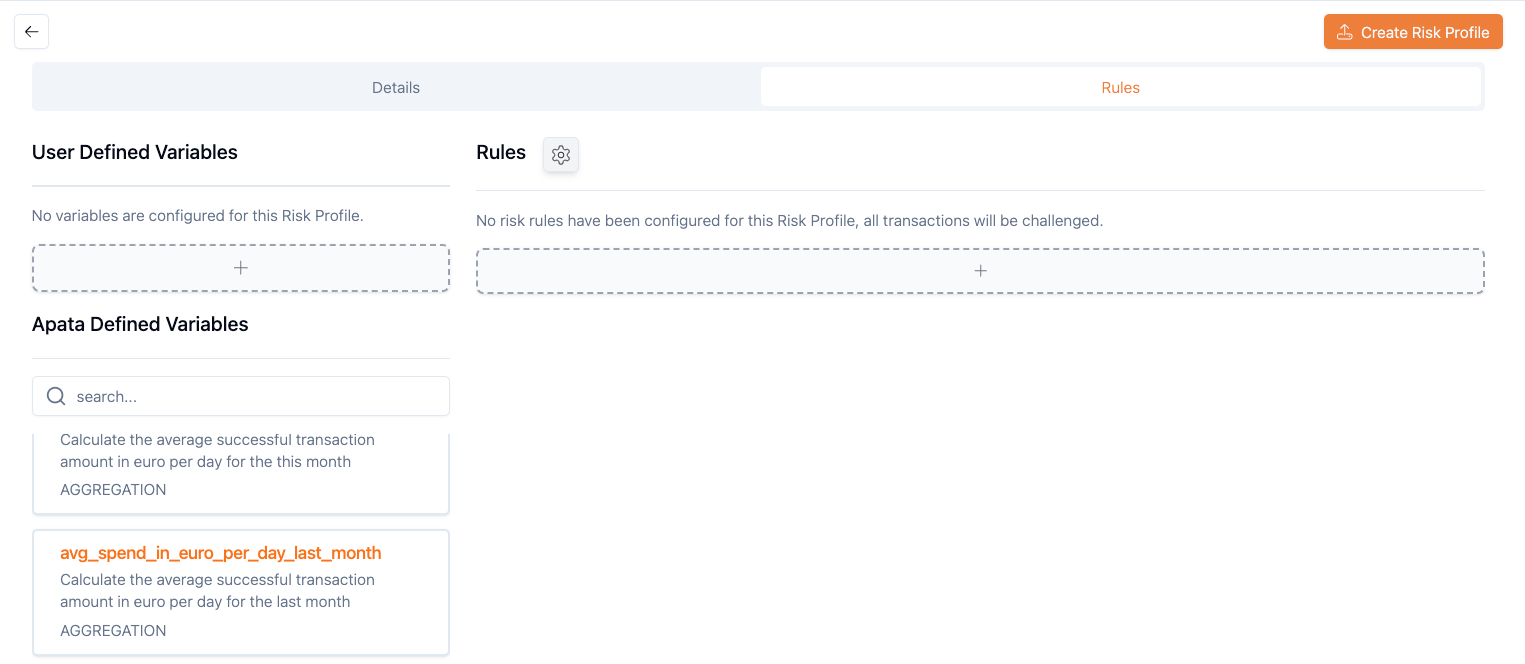
- Navigate to Risk Profiles → select or create a profile
-
Click + under "User Defined Variables"
-
Select Average aggregation type
-
Configure Parameter, Bucket, Timeframe, and Variable Name
- Use in a Conditional Rule
Related Aggregations
- Count – Count transactions or days
- Sum – Total transaction amounts
- Standard Deviation – Measure variability
Updated 6 months ago