
Fraud Reporting
Reporting fraudulent transactions to Apata.
Reporting fraudulent transactions to Apata feeds directly into the Risk Profile engine, increasing the risk weighting assigned to merchants and other parameters involved in the fraud. The more consistently issuers report fraud, the more accurately Apata can protect against it.
Fraud can be reported through two channels - the Portal for manual case-by-case reporting, or the API for automated reporting from your own systems.
Report fraud manually from the transaction detail page. Suitable for individual cases and chargeback management workflows.
Report fraud programmatically via the Update Transaction endpoint. Suitable for automated pipelines and bulk reporting from your fraud or chargeback system.
Reporting via the Portal
Step 1. Navigate to the transaction detail page for the transaction you want to report. Click the Report Fraud button.
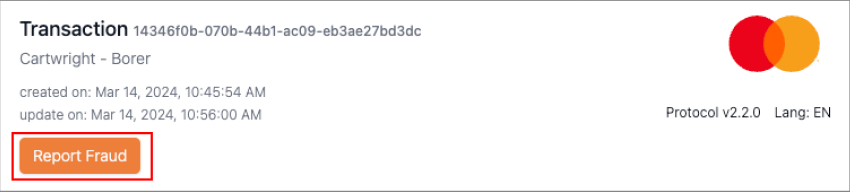
Step 2. The fraud reporting form will appear. Fill in the relevant fields and click Submit.
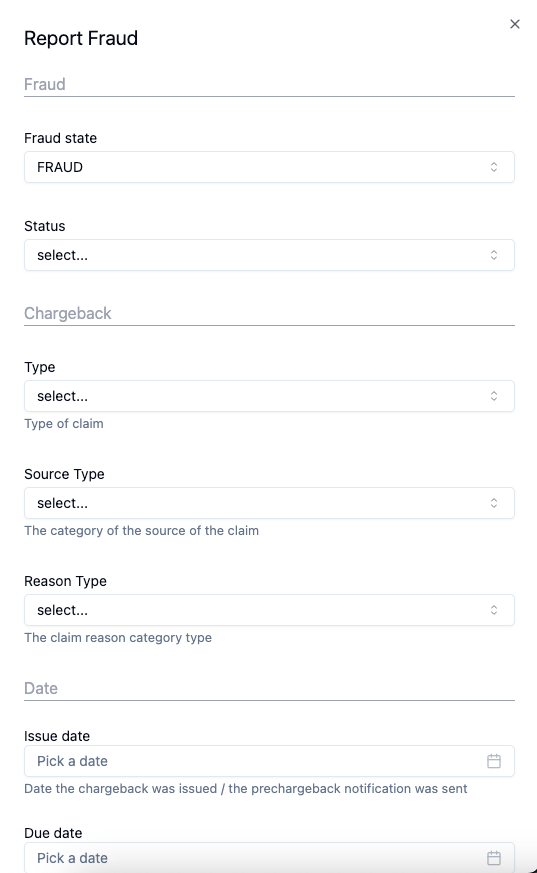
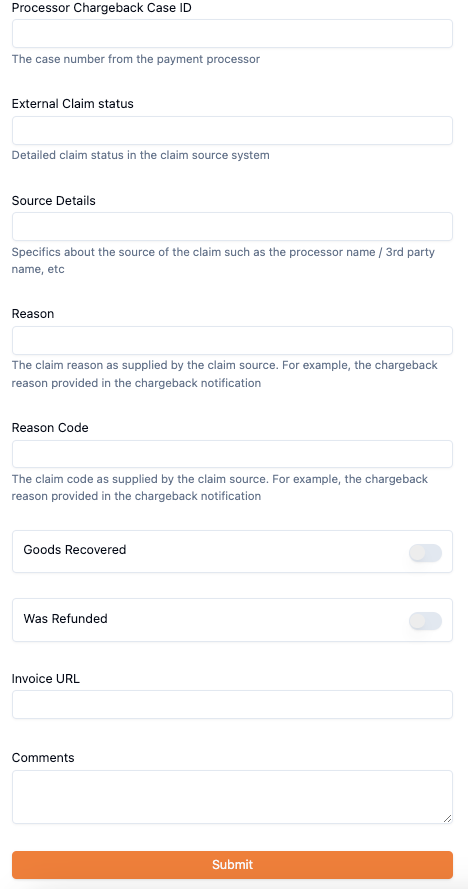
Once submitted, the transaction is flagged as fraudulent and a fraud indicator icon is displayed on the transaction detail page.

Click the fraud indicator icon at any time to reopen the form and modify the reported details, or to remove the fraudulent designation from the transaction entirely.
Form Fields
Fraud State
The only mandatory field. Classifies the transaction as fraudulent or legitimate.
| Value | Description |
|---|---|
FRAUD | Marks the transaction as fraudulent. |
NOT_FRAUD | Marks the transaction as legitimate. Use this to reclassify a transaction previously reported as fraud. |
The fraud state can be updated multiple times. A transaction initially reported asFRAUDcan be reclassified asNOT_FRAUDfollowing further investigation.
Optional Fields
Claim Details
| Field | Description |
|---|---|
status | Current phase of the claim, reflecting the processor's chargeback dispute status. Values: OPEN, IN_DISPUTE, WON, LOST, CANCELED. |
type | Classification of the claim. Values: CHARGEBACK, PRE_CHARGEBACK, DEBIT_MEMO. |
sourceType | Origin category of the claim. Values: PROCESSOR_CB, AMEX, DISCOVER, PAYPAL, PROCESSOR_INQUIRY, CUSTOMER_SUPPORT, SHIPPING_CARRIER, THIRD_PARTY, FORTER, OTHER. |
reasonType | Category of the claim. Values: FRAUD, SERVICE, OTHER, AUTHORIZATION, PROCESSING_ERROR. |
issueDate | Date the chargeback was issued or the pre-chargeback notification was dispatched. |
dueDate | Final date for disputing the claim, as stipulated by the processing entity. If not applicable, the issue date is used. |
Reference & Source
| Field | Description |
|---|---|
processorChargebackCaseId | Unique case identifier provided by the payment processor (e.g. CB-4343343219). |
externalClaimStatus | Description of the claim's current status in the originating system (e.g. pending merchant response). |
sourceDetails | Information about the origin of the claim, including the name of the processor or third party (e.g. UPS). |
reason | Rationale provided by the claim source for the chargeback (e.g. Fraudulent Transaction: Card Not Present Environment). |
reasonCode | Specific code assigned to the claim by the originating source (e.g. 83). |
Pre-Chargeback & Resolution
| Field | Description |
|---|---|
goodsRecovered | Applicable to pre-chargeback claims only. Indicates whether goods that had not yet been dispatched or delivered were subsequently retrieved. |
wasRefunded | Applicable to pre-chargeback claims only. Indicates whether the cardholder received a refund. |
invoiceUrl | Direct link to the customer's invoice (e.g. mystore.com/invoices/abc123). |
comments | Any additional remarks about the case (e.g. Contacted customer via phone). |
Reporting via the API
Use the Update Transaction endpoint to report fraud programmatically. This is the recommended approach for automated pipelines or bulk reporting from an external chargeback system.
See the Update Transaction API reference for the full request schema and authentication requirements. The request must include your organisation ID, Financial Institution ID, and API key in the headers.
Example Request
{
  "id": "b4ecd665-87c0-4d05-919d-b50e66e62608",
  "fraudState": "FRAUD",
  "status": "OPEN",
  "type": "CHARGEBACK",
  "sourceType": "PROCESSOR_CB",
  "reasonType": "FRAUD",
  "issueDate": "2019-08-24T14:15:22Z",
  "dueDate": "2019-08-24T14:15:22Z"
}
Key Fields
| Field | Required | Description |
|---|---|---|
id | Required | Unique identifier of the transaction to mark as fraudulent. |
fraudState | Required | Set to FRAUD to flag the transaction, or NOT_FRAUD to reclassify it. |
status | Optional | Current phase of the claim. Use OPEN for new or unresolved cases. |
type | Optional | Classification of the claim (e.g. CHARGEBACK). |
sourceType | Optional | Origin of the claim (e.g. PROCESSOR_CB for processor chargeback). |
reasonType | Optional | Category of the claim (e.g. FRAUD, SERVICE, PROCESSING_ERROR). |
issueDate | Optional | Date the chargeback or pre-chargeback notification was issued. |
dueDate | Optional | Deadline for disputing the claim. Defaults to issueDate if not provided. |
All optional fields from the Portal form are also available via the API. See the API reference for the complete list.
Updated 6 months ago