
Standard Deviation Aggregation
The Standard Deviation aggregation measures the variability of transaction amounts or counts within a defined timeframe. Use it to detect anomalies by identifying transactions that significantly deviate from typical patterns.
Identify transactions outside the normal range.
Monitor consistency of cardholder spending.
Flag unusually high or low transaction amounts.
Configuration
Parameter
| Parameter | Description |
|---|---|
| Transactions | Std dev of transaction counts |
| Amount (EUR) | Std dev of spend in EUR |
| Amount (USD) | Std dev of spend in USD |
Filter (Optional)
Narrow the calculation to specific conditions:
- Transaction status
- Merchant name or ID
- Device IP or ID
Timeframe
| Timeframe | Values |
|---|---|
| Hour | 1–24 |
| Day | 1–365 |
| Week | 1–52 |
| Month | 1–12 |
| Since Last Challenged | N/A |
| Since Last Frictionless | N/A |
Variable Name
Unique identifier (e.g., stdDevSpend24h, stdDevTransSinceChallenge).
Using Standard Deviation in Rules
stdDevSpend24h > 50 → ChallengeCheck if the standard deviation exceeds a threshold.
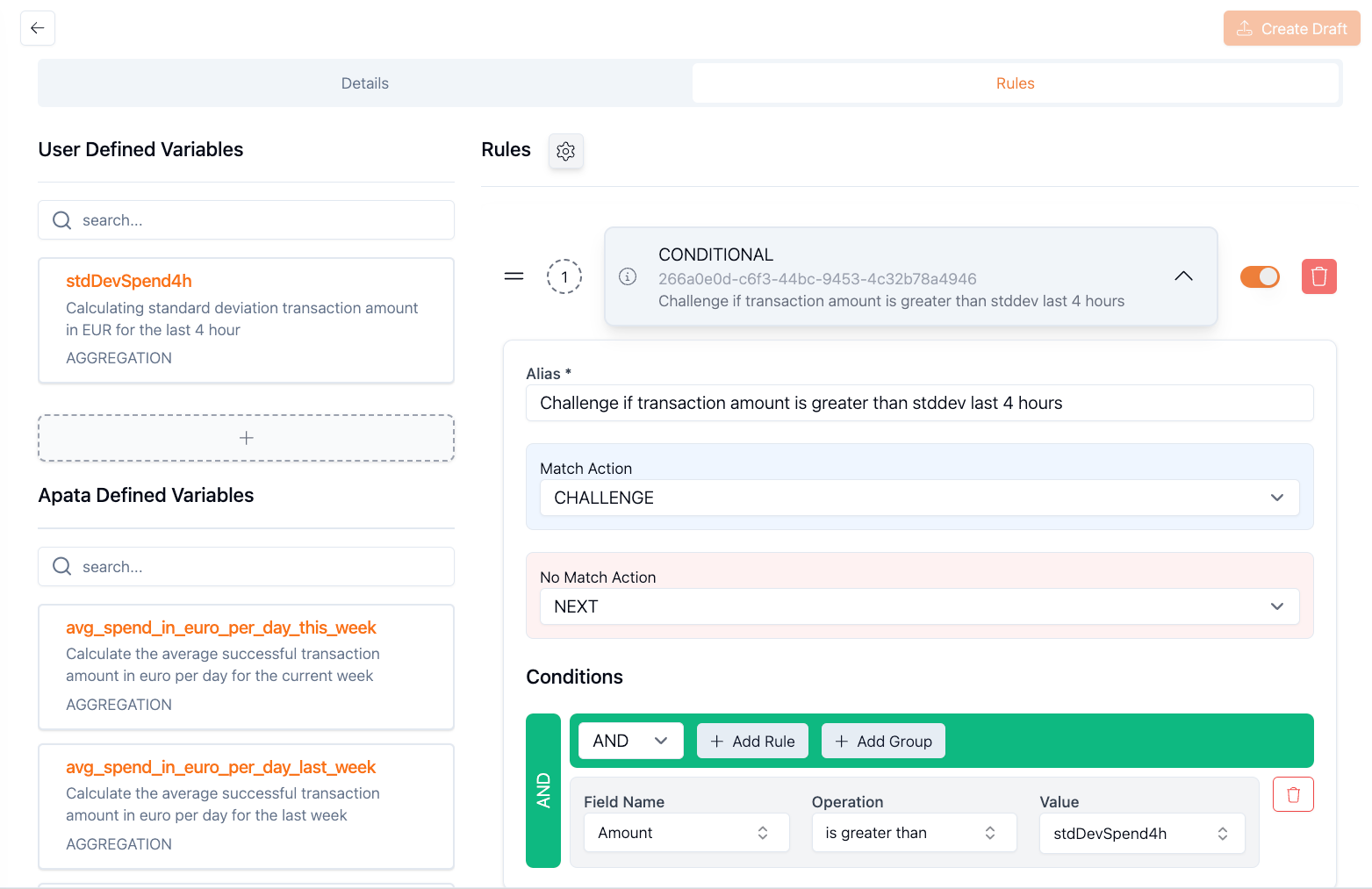
amount > stdDevSpend24h → ChallengeCompare the transaction amount to the standard deviation.
Examples
Spend Deviation in 24 Hours
Detect transactions deviating from typical spend.
Type: Standard Deviation
Parameter: Amount (EUR)
Filter: Transaction Status = Succeeded
Timeframe: 24 hours
Variable Name: stdDevSpend24h
Rule: amount > stdDevSpend24h → Challenge
Spend Deviation by Device IP
Monitor spending variability from specific IPs.
Type: Standard Deviation
Parameter: Amount (USD)
Filter:
  - Transaction Status = Succeeded
  - Device IP = Equals to Current
Timeframe: 24 hours
Variable Name: stdDevSpendUSD24hByIP
Rule: amount > stdDevSpendUSD24hByIP → Challenge
Merchant-Specific Deviation
Track spending variability at a specific merchant.
Type: Standard Deviation
Parameter: Amount (EUR)
Filter:
  - Merchant Name = Equals to Current
  - Transaction Status = Succeeded
Timeframe: 24 hours
Variable Name: stdDevMerchantSpend24h
Rule: amount > stdDevMerchantSpend24h → Challenge
Transaction Count Deviation by Device
Identify unusual transaction frequency from devices.
Type: Standard Deviation
Parameter: Transactions
Filter:
  - Computed Device ID = Equals to Current
  - Transaction Status = Succeeded
Timeframe: 24 hours
Variable Name: stdDevTrans24h
Rule: transactionCount > stdDevTrans24h → Challenge
Deviation Since Last Challenge
Monitor spending consistency after fraud alert.
Type: Standard Deviation
Parameter: Amount (USD)
Filter: None
Timeframe: Since Last Challenged
Variable Name: stdDevSpendSinceChallenge
Rule: amount > stdDevSpendSinceChallenge → Challenge
How It Works
sequenceDiagram
    participant Card
    participant Aggregation as Aggregation Engine
    participant Rule as Conditional Rule

    Note over Card,Rule: 4-hour window

    Card->>Aggregation: Transaction 1: €100
    Aggregation-->>Aggregation: stdDev = €0 (no prior)
    Aggregation->>Rule: amount > stdDev? (Yes, challenge)

    Card->>Aggregation: Transaction 3: €50
    Aggregation-->>Aggregation: stdDev = €10
    Aggregation->>Rule: amount > stdDev? (Yes, challenge)

    Card->>Aggregation: Transaction 4: €5
    Aggregation-->>Aggregation: stdDev = €22.48
    Aggregation->>Rule: amount > stdDev? (No, accept)
Standard deviation increases as the spread of historical values increases.
Understanding Standard Deviation
| Std Dev Value | Meaning |
|---|---|
| Low (close to 0) | Transactions are consistent |
| High | Transactions vary significantly |
When amount > stdDevSpend, the current transaction is larger than the typical variability, indicating a potential anomaly.
Getting Started
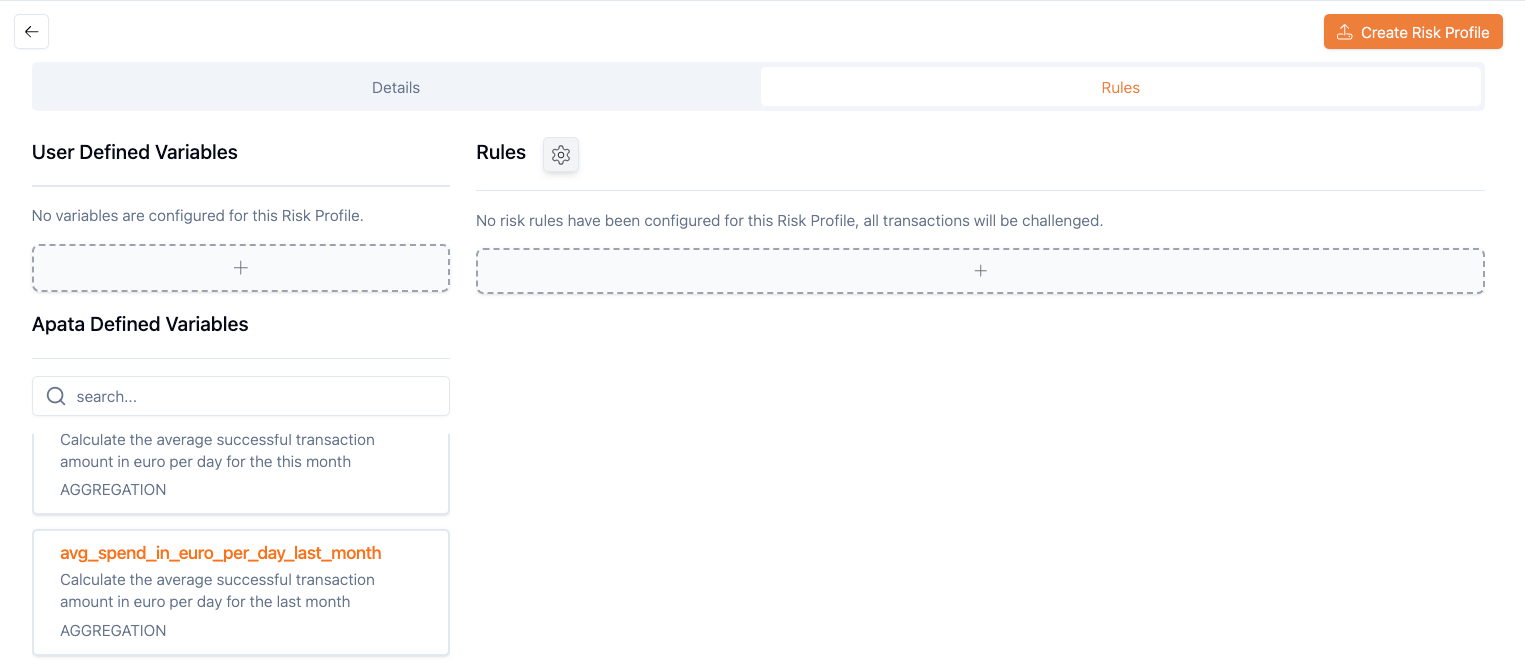
- Navigate to Risk Profiles → select or create a profile
-
Click + under "User Defined Variables"
-
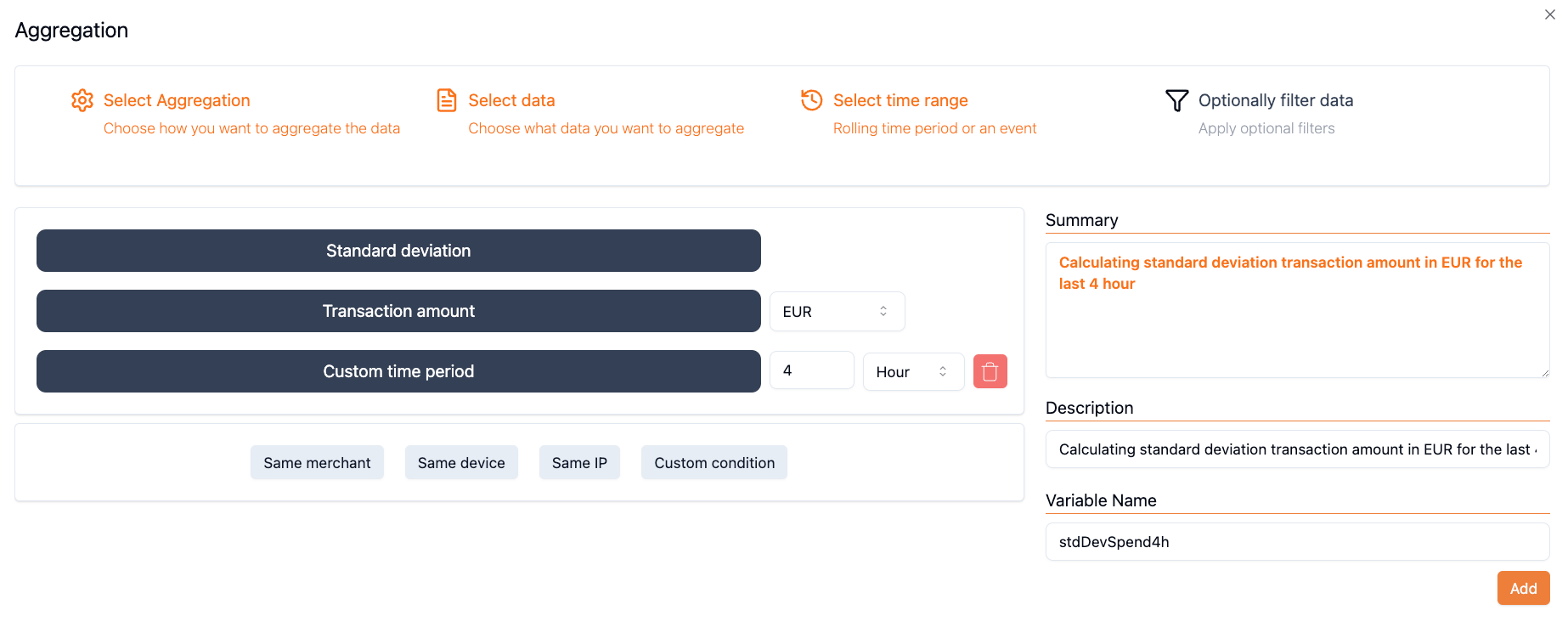
Select Standard Deviation aggregation type
-
Configure Parameter, Filter, Timeframe, and Variable Name
- Use in a Conditional Rule
Related Aggregations
- Count – Count transactions or days
- Sum – Total transaction amounts
- Average – Mean transaction values
Updated 6 months ago