
Risk Variables
Variables are dynamic, reusable data points in a Risk Profile that monitor and analyze card-level transactions in real time. By defining variables with aggregations, you can track patterns like total spend, transaction frequency, or unusual activity over specific timeframes.
Spot suspicious patterns like sudden spending spikes or repeated failed attempts.
Reuse variables across multiple Risk Rules to reduce complexity.
Tailor aggregations to focus on specific merchants, devices, or timeframes.
Variables can be used in Conditional Rules as a field (e.g.,averageSpend > 500) or as a value (e.g.,amount > averageSpend).
Aggregation Types
Aggregations collect and summarise transaction data over a specific period.
| Aggregation | Description | Example |
|---|---|---|
| Count | Counts transactions or days | Track transactions in 24 hours |
| Sum | Adds up transaction values | Calculate total spend in 7 days |
| Average | Calculates mean transaction value | Find average spend per day |
| Standard Deviation | Measures deviation from patterns | Detect unusual amounts |
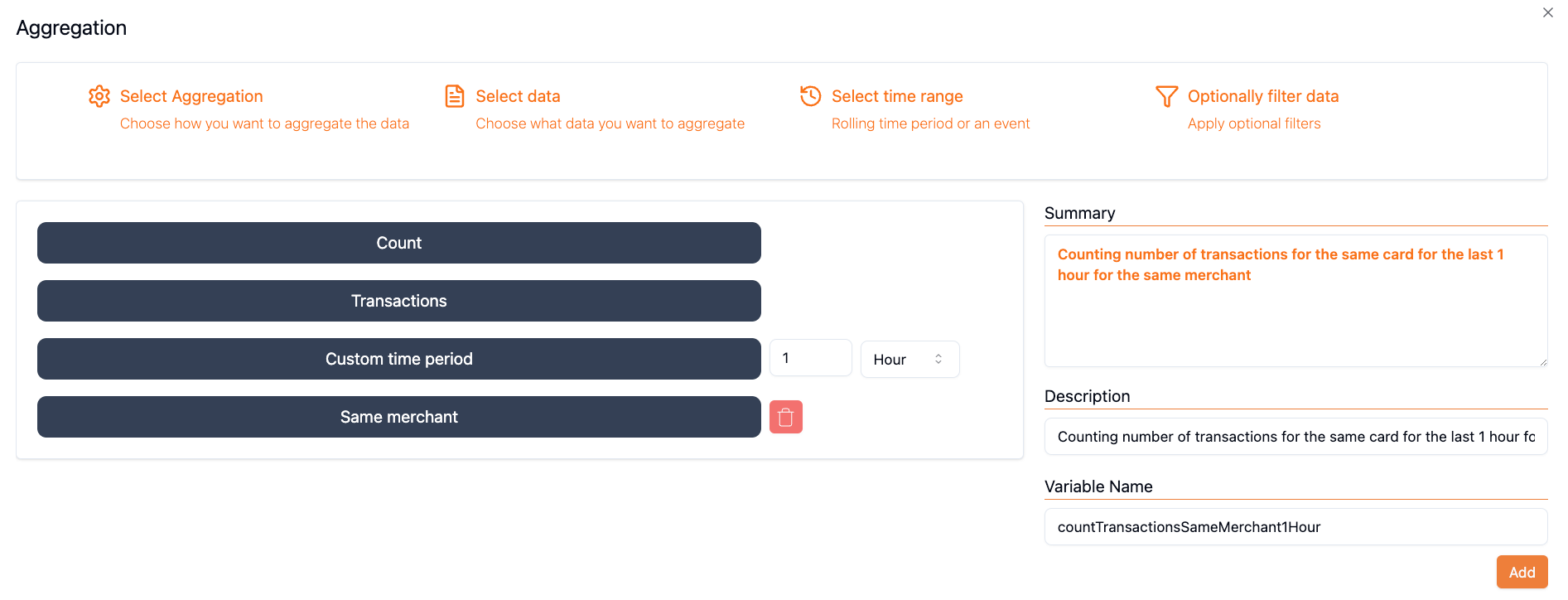
Configuration Options
Parameter
What to measure in the aggregation:
| Parameter | Description |
|---|---|
| Transactions | Count or analyze transaction events |
| Days | Count days meeting criteria (Count only) |
| Amount (EUR/USD) | Sum, average, or std dev of amounts |
Filters
Narrow the aggregation to specific conditions:
Predefined Filters:
- Same merchant – merchant name or ID equals current
- Same device – Possession Device ID or Computed Device ID equals current
- Same IP – IP address equals current
Custom Filters:
| Filter | Description |
|---|---|
| Merchant Name/ID | Filter by specific merchant |
| Device IP | Filter by IP address |
| Amount (EUR/USD) | Filter by amount thresholds |
| Transaction State | Filter by status (Succeeded, Failed, etc.) |
| Device ID | Filter by possession or computed device ID |
Filters can use a specific value or "Equals to Current" to dynamically match the current transaction.
Timeframes
The period over which to calculate the aggregation:
| Timeframe | Values | Description |
|---|---|---|
| Hour | 1–24 | Short-term velocity |
| Day | 1–365 | Daily patterns |
| Week | 1–52 | Weekly analysis |
| Month | 1–12 | Long-term trends |
| Since Last Challenged | N/A | Activity since last challenge |
| Since Last Frictionless | N/A | Activity since last frictionless |
Variable Name
A unique identifier for your variable:
- Use descriptive names (e.g.,
totalSpend24h,failedAuth24hByIP) - Must be unique within the Risk Profile
- Use alphanumeric characters and underscores
How Variables Work
sequenceDiagram
    participant Card
    participant Aggregation as Aggregation Engine
    participant Rule as Conditional Rule

    Note over Card,Rule: 4-hour window

    Card->>Aggregation: Transaction 1 (10:00)
    Aggregation-->>Aggregation: transactionCount4h = 0
    Aggregation->>Rule: Evaluate: count > 3? (No, accept)

    Card->>Aggregation: Transaction 2 (10:30)
    Aggregation-->>Aggregation: transactionCount4h = 1
    Aggregation->>Rule: Evaluate: count > 3? (No, accept)

    Card->>Aggregation: Transaction 5 (13:00)
    Aggregation-->>Aggregation: transactionCount4h = 4
    Aggregation->>Rule: Evaluate: count > 3? (Yes, challenge)
Variables are calculated based on historical transactions in the timeframe window, excluding the current transaction.
Using Variables in Rules
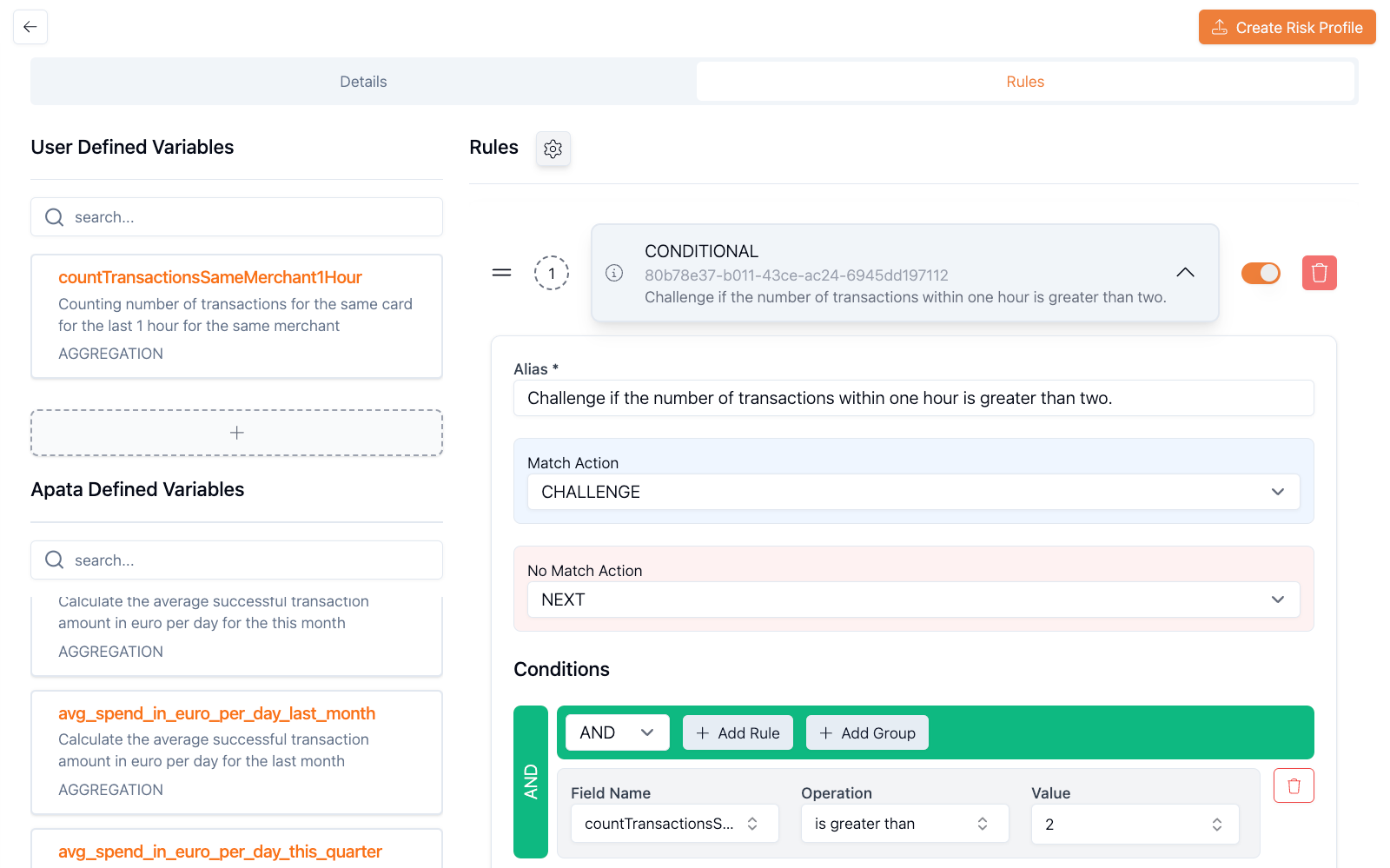
Once created, variables are available in Conditional Rules:
Check if the variable exceeds a threshold:
successfulAuth24h > 10 → Challenge
totalSpend24h > 1000 → Reject
Compare transaction data against the variable:
amount > averageSpend → Challenge
transactionCount > avgTransPerDay → Reject
Practical Examples
Account-Level Velocity
Frictionless Transactions in 24 Hours
Type: Count
Parameter: Transactions
Filter: Was Challenged = false
Timeframe: 24 hours
Variable Name: successfulAuth24h
Rule: successfulAuth24h > 5 → Challenge
Merchant-Level Velocity
Successful Transactions at Same Merchant
Type: Count
Parameter: Transactions
Filter:
  - Transaction Status = Succeeded
  - Merchant Name = Equals to Current
Timeframe: 24 hours
Variable Name: merchantSuccess24h
Rule: merchantSuccess24h > 5 → Challenge
Device-Level Velocity
Failed Attempts from Same Device
Type: Count
Parameter: Transactions
Filter:
  - Transaction Status != Succeeded
  - Computed Device ID = Equals to Current
Timeframe: 24 hours
Variable Name: deviceFailed24h
Rule: deviceFailed24h > 3 → Challenge
Spending Anomaly
Total Spend Exceeds Threshold
Type: Sum
Parameter: Amount
Filter: Transaction Status = Succeeded
Timeframe: 24 hours
Variable Name: totalSpend24h
Rule: amount > totalSpend24h → Reject
Viewing Variable Values
See variable values in the evaluation log on the transaction page:

Predefined Variables
Apata provides Predefined Variables that are automatically calculated for all risk profiles. These track average successful transaction amounts in EUR and USD over various timeframes.
Predefined variables cannot be modified but can be used directly in Conditional Rules.
Getting Started
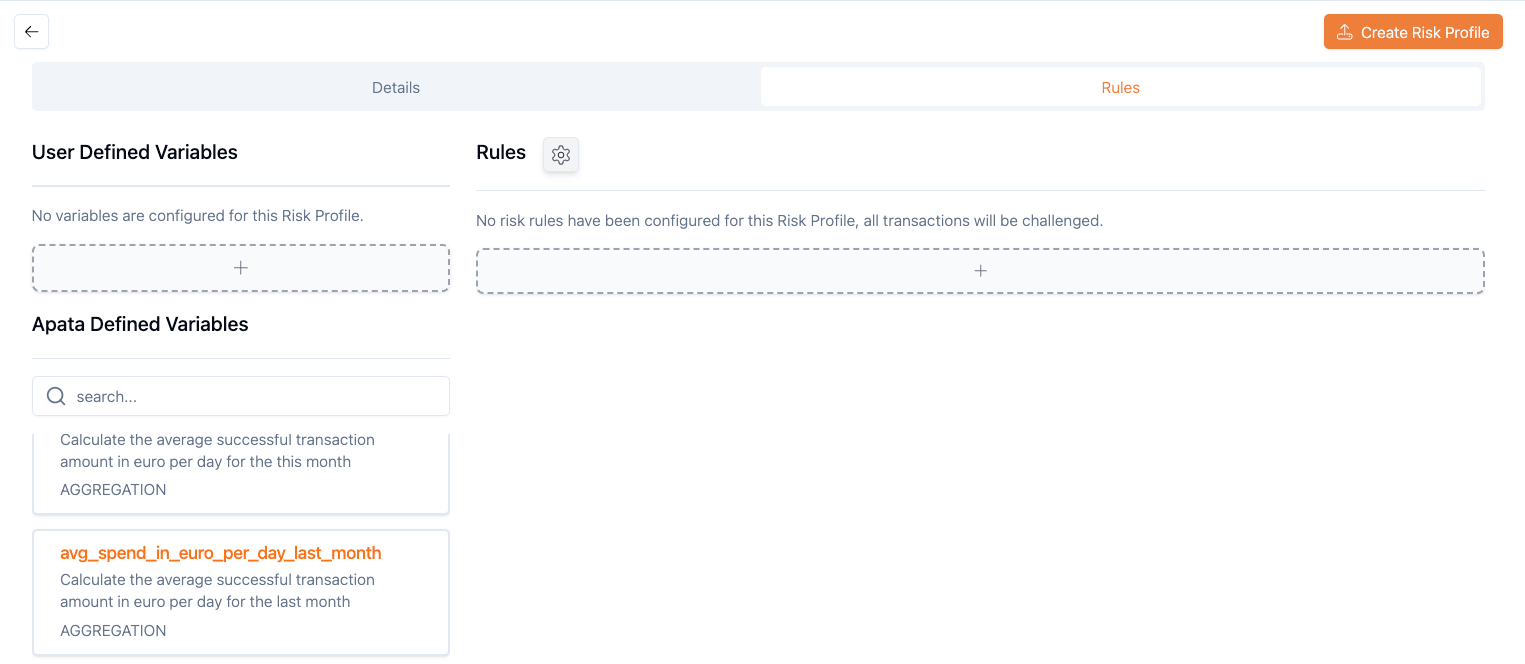
- Navigate to Risk Profiles and select or create a profile
-
Click + under "User Defined Variables"
-
Choose an aggregation type and configure settings
- Use the variable in a Conditional Rule
FAQ
Can I create multiple variables with the same name?
No. Each variable must have a unique name within a Risk Profile.
What happens if no transactions match my filter?
The variable returns a default value (e.g., 0 for Count or Sum).
How often are variables updated?
Variables are calculated in real-time during transaction processing.
Can I use predefined and custom variables together?
Yes. Both types can be used in the same Conditional Rule.
What timeframes are supported?
Minimum: 1 hour. Maximum: 12 months.
Related Topics
- Count Aggregation – Count transactions or days
- Sum Aggregation – Total transaction amounts
- Average Aggregation – Mean transaction values
- Standard Deviation – Measure variability
- Predefined Variables – Ready-to-use aggregations
Updated 6 months ago